IP Device Configuration
You can integrate
Intrado partners with a number of hardware manufacturers who
make these different products, and they are all certified to work with
Once you add the device to your network,
View all your registered IP devices at Configuration > Other Devices > IP Device, and select the IP Devices tab.
-
Triggers — If the device has contact closures, which may support buttons or sliders,
You assign this device as the trigger when creating a notification, therefore, when someone comes by and pushes the button, adjusts the slider, or activates whatever mechanism that causes contact closure, the associated notification is activated.
You can also assign location information to the device so that if it is used to activate a notification, you can provide the location in the notification.
View all your recognized IP devices that can be triggers at Configuration > Other Devices > IP Device, and select the Actions tab.
-
Endpoints — For example, if the device is a speaker that can receive audio and scroll text when it receives a notification,
View all your recognized IP devices that can be endpoints at Configuration > Endpoints, and select the Endpoint List tab.
-
Dual-use — Some devices can be both an endpoint and trigger. For example, an IP Speaker can receive notifications (endpoint) and also be used to activate a notification (trigger) because
Therefore,

 IP Device Recognition
After connecting an IP device to your network, it receives its IP Address from a
Dynamic Host Configuration Protocol (DHCP). At this point it will auto-register to
Note: If your IP device has stopped working properly, first reboot the device to force re-registration with
IP Devices Triggering Notifications
You can set up notifications to be triggered by an IP device. There are many types of IP devices, including buttons, strobes, and Paging Relays.
IP devices can trigger (or activate) notifications, such as panic buttons and sensors.
For example, I'm a small business owner and am not always in the front of my store. I want to make sure I know when a customer has entered. So, I have a "Customer Entered" notification set up that plays a simple chime whenever the door to my business opens. This is accomplished by setting up a sensor at the door of my business. When the door opens, the sensor is triggered, which then triggers my notification to play the chime.
See the Stored Audio Notification example.
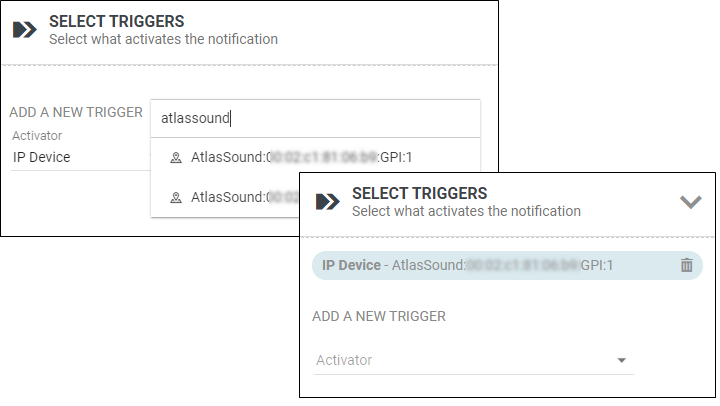
To add an IP device as a trigger when creating or editing a notification:
-
Go to the Select Triggers section.
-
For Activator, select IP Device and search for a specific device.
IP Devices Receiving Notifications
You can set up notifications to be sent to endpoints that are IP devices, such as IP speakers and signs.
You can view them by going to Configuration > Endpoints, and selecting the Endpoint List tab.
To add an IP device as an endpoint to your notification:
-
Go to the Select Endpoint & Contact Selection section.
-
Select your IP device from the Endpoints tab or narrow down the selection in the System Tags tab, for example using groups such as Manufacturer or Model.
See the topic Configuring Endpoints for more information.
IP Devices GUI Overview
From the IP Devices page, you can manage many aspects of your IP devices. Access the page by selecting Configuration > Other Devices > IP Device.
-
IP Devices tab — Review all IP devices recognized by
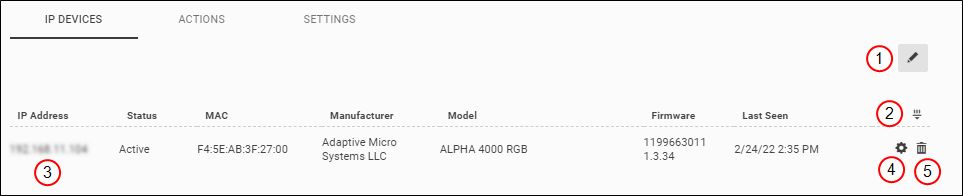
Action Description 1 Bulk Deleting IP Devices 2 Filter the list of devices. 3 Open the IP Address of the device to access the device settings directly. 4 View a modal window of the device settings.
For Paging Relays, configure them reach additional multicast networks or networks that are not using standard 254 device CIDR setup (Classless Inter-Domain Routing). See the Paging Relays topic.
5 Delete a single IP device. -
Actions tab — Review all IP devices that can be used as triggers to notifications.

Action Description 1 2 Downloading IP Device Action Properties to CSV 3 Refresh the list of actions 4 Filter the list of actions
5 Edit the action properties in a new window. See Editing IP Device Details. -
Settings tab — Control various settings related to IP devices.
-
General Settings
-
IP Device Polling Interval — Define how often you want
Note: Polling does not remove inactivate or retired devices.
-
IP Request Timeout — If your network is slow, you may want to allow more time for
-
-
Advanced Settings — Most customers will never need to adjust these settings. We recommend using the default settings unless you are trying to reach large numbers of endpoints (several thousands) in as short a time as possible. Adjusting these settings allows
-
Device Authentication Credentials —
-
Rate Limit Count and Rate Limit Time – Adjusting these settings allows
Most customers will never need to adjust these settings. We recommend using the default settings unless you are trying to reach large numbers of endpoints (several thousands) in as short a time as possible.
The settings work like this:
within x amount of time, process n number of notifications to endpoints
where x=Rate Limit Time and n=Rate Limit Count.
Less rate time / higher rate count – decreases the chances of
More rate time / lower rate count – increases the chances of
-
-
Bulk Deleting IP Devices
From the IP Devices page, you can delete active or inactive devices. See Decommissioned Hardware for more information about inactive devices.
- (optional) If deleting an inactive device, once you have removed the device wait for the Revolution system heartbeat (minimum 3 minutes) so the device registers as inactive.
- Go to Configuration > Other Devices > IP Device.
- (optional) Filter the list to narrow down the devices shown.
- Select the Edit icon
 then Bulk Delete.
 - Do one of the following:
- Select the header check box to select all devices in filter results.
- Select the check box for individual devices.
- Select Delete Selected.
Editing IP Device Details
Once
-
Go to Configuration > Other Devices > IP Device.
-
Select the Actions tab.
-
Filter (
 ) for the IP Device you want to edit.
 -
Select the IP Device Name to open the General Settings page for the device.
-
Name – Change the name
Renaming an IP Device: Configuration > Other Devices > IP Device; Filter for and Edit device; Name field.
Note: Each Paging Relay has a GPI, GPO (Relay), and Line Out. GPI is a trigger; Relays and Line Outs are endpoints. You can only change the name of GPIs.
-
For Available in All Sites:
- Enable to ensure all your site locations have access.
- Disable and select a Site to limit which site has access.
-
Activate On – Set the activation rule for the IP Device; will it trigger when opened, closed, or both.
Setting activation rule for an IP Device: Configuration > Other Devices > IP Device; Filter for and Edit device; Activate On field.
For example, assume you have several emergency alert stations around your college campus and that each station has a panic button and an IP speaker. You could create a high-priority notification called Panic Alert that sends a message to your security phones and sends an audio file to the IP speaker announcing that "Security is on the way". In this case, you need to decide if you want the IP device to trigger when the panic button is pushed down (pin closed) or when the panic button is released (pin open).
-
Location – Enter a name for the location.
This value is used for the source.location text variable in notifications.
-
Location Map – Use the map to select the latitude and longitude of the device.
Setting location information for an IP Device: Configuration > Other Devices > IP Device; Filter for and Edit device; use the Location field and Location Map.
-
Enter a Location – Use this to narrow down the map.
-
Drop Pin – Select this to place a movable pin at the center of the map, which you can move to refine the location.
As you move the Pin around, the Latitude and Longitude boxes will adjust. You will need to manually enter any Elevation data.
-
-
Downloading IP Device Action Properties to CSV
You can download a CSV file of your IP Device action properties for your own records or to edit and reimport into
-
Go to the Actions tab.
-
(optional) Filter the list of IP device actions to narrow down the list to include only those devices you want to capture in the CSV. If you do not filter the list, you will download information from all IP devices.
-
Select the download icon.
-
In the resulting dialog box, specify the name and location for saving your CSV file.
Importing IP Device Action Properties from CSV
You can edit IP device action properties by importing a CSV file.
It is suggested that you download action property information from
Note: Do not edit the Action Urn column, as that is how you will match your edited data to the information in
You can use headers within your CSV file to assist in the import, as
The values you select from the CSV will overwrite any existing data.
-
Create a new, or edit an exported, CSV file containing information to add to existing actions.
CSV Formatting Rules
-
Header — (optional) You may include a header that defines the data order.
The header values must match the built-in fields, which are:
Name, ActionUrn, IPAddress, MAC, ActivateOn, Location, Latitude, Longitude, Elevation
Note that the UI drop-down values are in a more user-readable form, for example different capitalization and spaces.
If you do not include a header, you will still be able to match the data to one of the built-in fields.
Note:
-
Required Columns — The CSV must include at least two columns.
One column that identifies what you want to match the data to, which must be Action Urn.
A second column containing another property data.
-
The CSV can include any additional columns, including any information you may not want to import, as you can ignore the information during import.
-
- From the Actions tab, select the Bulk Edit icon then Bulk Update from CSV.
- Use Choose File to load your CSV file.
- The Column Mapping window allows you to define how the columns of the CSV should be used. It will only show the first 10 rows of your table to assist you in the import.
- For Match Data to, select Action Urn to match the information you have in your CSV.
- Use the drop-down of the column selectors to define which property the column defines, or whether you want to ignore the column.
- Select Import.
Bulk Updating IP Device Action Properties
You can edit IP device action properties in a single view and submit them all at once.
- (optional) Filter the list of actions to narrow down the entries you want to edit.
-
Select the Bulk Edit icon and then Bulk Edit Properties.
-
For each action, you can edit the following properties:
Name, Activate On, Location, Latitude, Longitude, and Elevation
-
Select Apply Changes to finalize your edits.
Configuring IP Device Global Settings
Go to Global Settings and select IP Device to set the following behavior:
-
IP Device Inactive Interval — By default,
Rebooting an IP device
Should the IP device become unregistered, you can reboot it from the IP Devices page. For example, if the status column shows Unknown.
- Go to Configuration > Other Devices > IP Device.
- Find your Device.
- Select Settings
 to view details about the device.
 - Select Reboot.
For some older devices, you may need to reboot them from the device interface. Refer to the device documentation for instructions.
Retiring Devices
When a device is no longer used, follow the steps in the Decommissioned Hardware topic for the type of IP device.
Once you have retired the device,
Refreshing the IP Device Module
You can instruct
-
Go to Status > System Status.
-
Expand the IP Devices Module.
-
Select Refresh.
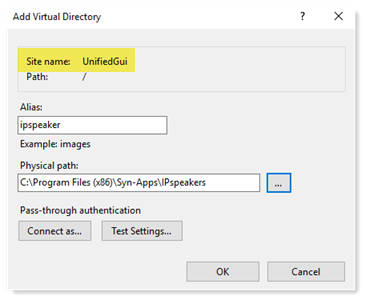
Creating a virtual directory on Note: An empty ipspeaker.xml file is provided for your convenience. Consult your speaker manufacturer's documentation on how to configure the file. Typically, this file is used to configure your speaker clock.
- Log in to the
- Open Windows IIS Manager.
- In the Connections pane, expand your local host > Sites.
- Right-click on UnifiedGui and select Add Virtual Directory.
- Enter IPspeaker as the Alias.
- For Physical path, create or select an existing folder for the ipspeaker.xml file and click OK.
- Open File Explorer and put a copy of your ipspeaker.xml file for your legacy IP speakers into the c:\Program Files (x86)\Syn-Apps\IPspeakers folder you just created. Consult your speaker documentation to find out where the ipspeaker.xml file is stored.
-
Verify the ipspeaker.xml file is present.
Browse to http://<IP address>/<folder name>/ipspeaker.xml
where <IP address> is your
- Download the ipspeaker.xml file and verify its contents are correct. This also verifies the speaker will be able to download the XML file.
Tip: We recommend creating a new folder in c:\Program Files (x86)\Syn-Apps called IPspeakers. Browse to c:\Program Files (x86)\Syn-Apps, then click Make New Folder > type IPspeaker > select OK.