Utilize Extension Mobility
Cisco IP phones support extension mobility, sometimes referred to as extension reassignment, where a user can log in to, and thus reassign, their extension to a new phone.
- Go to Status > System Status > Cisco Module.
- Select Refresh Data.
Notifications to Destination Codes
You can send notifications to a Destination Code associated with a user's extension.
When a CUCM user logs into a new phone,
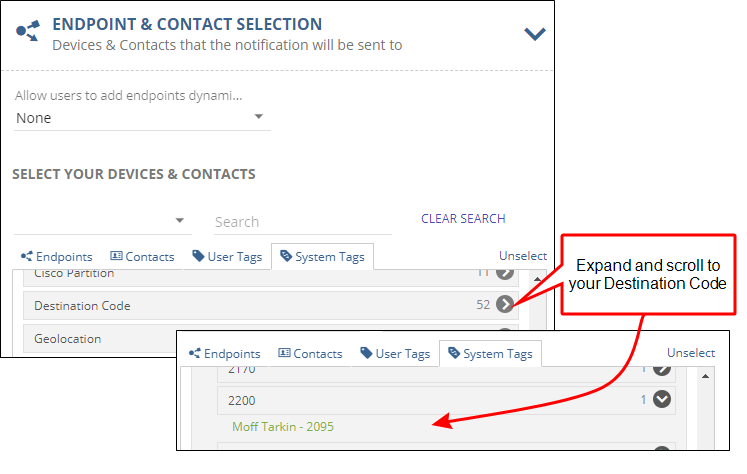
For example, assume that a user's CUCM extension is 2200 and they are currently logged into the Moff Tarkin phone. When they log out of their current phone and then into a new phone (Oliver Queen),
Notification to Internal Contacts
You can send notifications to a Cisco user by referencing their Contact information as an endpoint. To enable this feature, you must set up your CUCM as follows:
- Go to Configuration > Phone Systems > Cisco
- Select Settings
- Enable Import End Users
This will create a contact endpoint for all end users found on the CUCM.
You can then create notifications that will always go to a user, regardless of which phone they log into, using the following steps:
- Create a new or update an existing Notification
- Go to Endpoint & Contact Selection
- For Contacts, select the user
- For Choose Contact Methods, select Internal
Once a CUCM user logs into a phone, on the next
Tip: You can also add Jack Bauer as a contact with Internal Communication Method checked. Wherever Jack is logged in, the notification reaches him. (See Destination Codes for more information.)
Assign the CUCM user's destination code (extension assigned to the user account in CUCM) instead of assigning an endpoint.
- Go to Endpoint & Contact Selection.
- Select System Tags.
- Expand the Destination Code group and scroll to find the Destination Code (expanding any subgroups as necessary.
- Select the destination code to add it as a notification recipient.
