CAP Module Overview
Note: Only All Sites Admins have full access to configuration.
The CAP (Common Alerting Protocol) module monitors CAP alert feeds from external sources – such as the National Weather Service (www.alerts.weather.gov) and the Integrated Public Alert Warning System (www.fema.gov/common-alerting-protocol) – and pushes these alerts through a
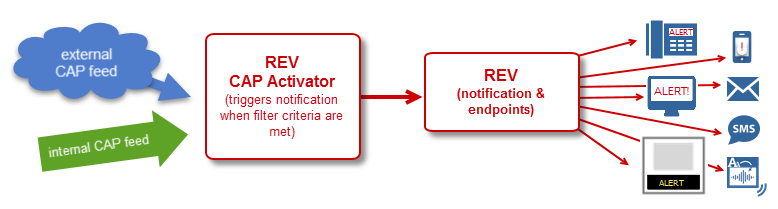
 There are two basics steps to using a CAP service
- Create a CAP trigger to monitor an external CAP feed.
- Create a notification:
- Triggered by the CAP service you created.
- Containing the content from the CAP alert. Optionally, you can add your own content.
- Delivered to the endpoints that you want to receive the CAP alert.
We provide three CAP service templates
- National Weather Service (NWS) – With this service template, we've already configured most of the CAP requirements for you. The minimum you need to do is define the geographic area you want to monitor, and then you're ready to assign the service to notifications.
- IPAWS Service – With this service template, we've already configured the service to the proper IPAWS URL. You will need to determine which filters to keep and remove.
- AMBER Alerts Service – With this service template, we've already configured most of the CAP requirements for you. The minimum you need to do is define the geographic area you want to monitor, and then you're ready to assign the service to notifications.
You can also create a trigger for a Monitor General CAP Feeds to monitor any external CAP feed available to you. You will need to input the CAP feed URL and determine which filters to keep and remove.
Setting up CAP triggers requires comfort with XML and a basic familiarity with the OASIS v1.2 CAP protocol.
Next steps
- Create a simple NWS, AMBER, or IPAWS CAP service.
- Read through the CAP Activator Mapping, CAP Timing Controls, Understanding CAP Filters topics before proceeding with creating complex NWS feeds or setting up IPAWS or CAP services.
